One app, the whole defence
Everything running on-device, no account
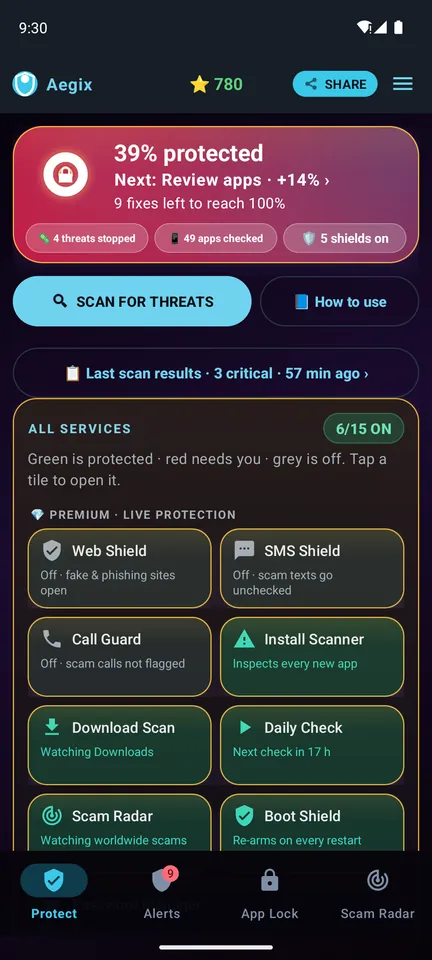
The protections a phone actually needs — scanning, filtering and an idle firewall — in one native app.
Scam-SMS warningsScam CheckerScam Radar (India)On-device threat scanHidden-app huntBanking-trojan signaturesSMS-access auditCall-forwarding auditSystem-wide web shieldEncrypted DNS filteringVault Lock idle firewallBackground-app monitorOn-demand file scanEmergency playbookProtection %Daily ScanInstall & Link GuardNo account neededNo ads
📩
Scam-SMS warnings
Switch it on and Aegix checks each new SMS as it arrives. A message that pairs a link with typical scam wording — KYC expired, OTP, SIM block, e-challan, PAN update — or matches a known malicious link gets a warning card marked Dangerous or Suspicious. It flags the message; it does not delete it. Coming soon: Scan for Threats lists each scam SMS it finds with Delete (opens it in your messages app), Block and Dismiss, and also catches fake FASTag, electricity and KYC messages.
🔎
Scam Checker
Paste or share any message, link or email into Aegix before acting on it. On-device rules look for look-alike bank and brand domains, link shorteners, fake government sites and pressure wording — plus India checks for UPI IDs and payment requests — and explain what they found.
📰
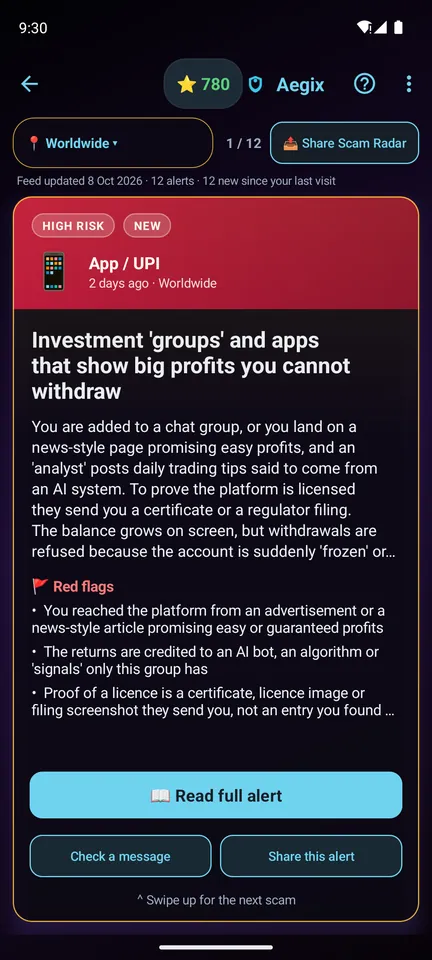
Scam Radar
India: the scams circulating right now — digital-arrest calls, KYC links, fake courier and electricity messages — each with red flags and what to do, filtered to your state. The same list is public on this site.
🔍
Threat intelligence scan
A deep inspection across the system’s layers, hunting for hidden apps, banking trojans, SMS stealers and stealth spyware — sorted into active threats, high-risk items and things worth a manual look.
🛡
Web shield
Phishing and known malware domains are blocked before the page loads, using encrypted DNS — system-wide, so every browser and app on the device is covered by the same filter.
🔒
Vault Lock
A screen-aware firewall: when the screen has stayed off for a while — overnight, say — Aegix cuts network access entirely, so nothing in the background has a way to send your data out.
📱
SMS-access & call-forward audit
Lists every app that can read your text messages — the access OTP stealers need — ranked by risk, one tap from the setting that removes it, and checks for the call-forwarding redirect scammers set up to intercept your bank’s verification calls.
📂
Background apps & file scan
See exactly what is running behind the screen you are looking at, and scan files on demand rather than waiting for a scheduled sweep.
⚠
An emergency playbook
If a confirmed threat is found, Aegix walks you through cutting the device off, calling your bank from a trusted phone, cancelling call-forwarding, removing flagged apps and changing passwords from a clean device.
🔑
Password Manager + Aegix Link
Generate strong passwords, save logins and autofill them on the phone — stored encrypted on the phone only, no password cloud. Need one on your Windows PC? Aegix Link sends a saved login from the phone to your PC browser, end-to-end encrypted.
📈
Protection % and Daily Scan
The home screen shows how protected the phone is as a percentage, from 17 real checks, with the next fix and how much it raises the score. With Premium, a Daily Scan runs the full scan by itself every day and its report waits on the home screen.
📎
Install Guard & Link Guard
Finds an app installer hidden inside a document, PDF or ZIP — the way “invoice” and “wedding card” files carry spyware — and, once you let it open links, checks a link you tap before the browser loads it. Safe links and files open as normal; a risky one shows a clear warning first.
Passwords on your PC
Aegix Link — your phone’s saved logins, on your Windows PC
Your passwords stay in Aegix on your phone. When you need one on a computer, open Aegix Link in Chrome or Edge, pair once, and send the login from the phone — no cloud vault, no typing long passwords by hand.
- On the PC open cryosim.com/projects/aegix/link and click “Pair a phone” — a 6-digit code appears.
- On the phone open Aegix › Password Manager › ⋮ › Link a PC, type the code and check both screens show the same fingerprint.
- Send a login — open it on the phone and tap “Send to PC”. It appears on the PC for 60 seconds with Copy buttons.
End-to-end encrypted: the server only relays data it cannot read and deletes each message on delivery or after 3 minutes. Aegix Link is an Aegix Premium feature (points); the PC page itself is free.
Now on Android and Windows
Aegix PC Security for Windows
A native app for Windows 10 and 11 that checks how well your PC is protected, finds scam tools and threats,
blocks dangerous sites, opens your bank in a sealed Safe Pay window and keeps the PC fast — with the same scam protection Aegix gives your phone.
✅
Security check & Protection %
One score for how well the PC is protected. Aegix checks Microsoft Defender, Firewall, Windows Update, BitLocker, UAC, SmartScreen, Secure Boot, Remote Desktop, the Guest account, SMBv1, AutoPlay and more — with one-click fixes.
🔍
Scan for Threats
A Microsoft Defender quick scan plus Aegix’s own checks: remote-access tools used in “refund” scams (AnyDesk, TeamViewer and similar), risky startup items, disguised and unsigned files, browser hijacks and risky extensions, and open Wi-Fi. Runs automatically every day.
🛡
Web Shield
Blocks 2,400+ known scam, phishing and malware sites across the whole PC, in every browser and app. Optional Safe DNS.
📰
Scam Radar & Scam Checker
Live scam alerts for your region. Paste an SMS, e-mail or link into Scam Checker — it is checked on your PC and nothing is uploaded.
🔑
Vault
Passwords, photos & videos, files and notes, encrypted on the PC behind one PIN or Windows Hello. Tag any item and list everything by tag. Passwords sync with Aegix on your phone; an encrypted backup (.aegixvault) moves everything between phone and PC, both ways. Also: logins from your phone with Aegix Link, a breach check (Have I Been Pwned, using k-anonymity, so the password never leaves the PC) and strong new passwords.
⚡
PC Boost, Storage, Apps & Toolbox
Everything Microsoft PC Manager does: one-click memory boost and Smart boost, health check, deep cleanup, large and duplicate files, downloads organizer, Storage Sense, process manager, startup apps, uninstall apps, pop-up blocking, default-browser protection, File Explorer, taskbar and network repair, and quick tools.
💳
Safe Pay
Opens bank, UPI, card, tax and investing sites in a sealed window built on Microsoft Edge WebView2. Only verified sites open, over HTTPS: about 60 built in, including 33 Indian banks on their new .bank.in addresses. Look-alike and scam addresses are blocked. The window is hidden from screenshots and screen sharing, pauses while AnyDesk, TeamViewer or another remote-access app runs, and deletes everything when it closes. It protects the browser window; it cannot stop malware that already controls Windows.
Free to downloadEverything on the PC is free. Aegix updates itself; every update is signed and checked before it installs.
Free on the PCLive protection on the PC is free too: Web Shield, scam and threat alerts, the daily scan and automatic cleanup. No account, no payment.
Works with your phoneAegix Link sends logins from the phone to the PC, and saved passwords can sync between them. An encrypted Vault backup (.aegixvault) moves photos, videos, files and notes both ways.
Scam SMS, UPI and OTP scams — questions answered
What is a KYC-update scam SMS?
Common in India: a message in the name of a bank, wallet or mobile operator saying your KYC has expired and the account or SIM will be blocked today, with a link to "update". The link opens a copy of the real login page, or downloads a fake banking app, and whatever you type — password, card number, OTP — goes to the scammer. Banks update KYC only in their own app, at the branch or through video KYC you start yourself, never through a link in an SMS.
Can a UPI request take money out of my account?
Yes (UPI is India’s instant-payment system). Your UPI PIN is needed only to SEND money, never to receive it. A "collect request" dressed up as a refund, cashback or "sent by mistake, please return" still debits you the moment you enter your PIN. Decline every collect request you did not start, and check your own bank or UPI app before believing any credit.
Is it ever safe to share an OTP on a call?
No. Banks, delivery companies, telecom operators, the police and government offices never ask you to read out an OTP. Scammers trigger a real OTP — a password reset, a card payment, a SIM or eSIM change — at the same moment they call. Read the OTP message fully: it says what it is for.
How does Aegix warn about scam SMS?
Once you switch on scam-SMS warnings (Aegix asks first and explains why it needs to receive SMS), it checks each new message on the phone as it arrives. A message that pairs a link with typical scam wording — an OTP request, a parcel or toll fee, an account block, and in India KYC expired, SIM block, e-challan, PAN update and similar — or matches a known malicious link gets a warning notification marked Dangerous or Suspicious, with a button to open it in Scam Checker. Aegix flags the message; it cannot delete or stop it, because Android allows only your default SMS app to do that.
Do I need an account, and does Aegix show ads?
No account, no sign-up and no phone-number OTP: install Aegix and run your first scan straight away. Aegix shows no ads, on the free tier or on Premium. The scan, Scam Checker, App Lock and Photo Vault stay free; live protection (scam-SMS warnings, Web Shield, Call Guard) is Premium: the first month is free for new users, then ₹49/month on Google Play.
Can I set Aegix up on my parents’ phone?
Yes — install Aegix on their Android phone and switch on scam-SMS warnings and Web Shield there. The warnings appear on their phone. Aegix does not send you copies of their messages or their alerts, and it needs no account.
Does Aegix replace Google Play Protect?
No. Keep Play Protect switched on. Aegix adds things Play Protect is not built for: warnings on scam SMS, a checker for suspicious messages and links (and UPI IDs in India), a list of scams circulating in India, and steps to follow if something is found.
Is there Aegix for a Windows PC?
Yes — Aegix PC Security, a native app for Windows 10 and 11.
Download it for Windows from this site (it installs for your user, no admin needed, and updates itself); a Microsoft Store version is coming soon. It adds a security check with a Protection score and one-click fixes, a threat scan, Web Shield, Scam Radar, Scam Checker, Safe Pay (a sealed window for verified bank and payment sites, hidden from screen sharing), an encrypted Vault for passwords, photos, videos, files and notes, and PC Boost and cleanup tools. Aegix PC Security is free — every feature, including live protection, with no account and no payment. On the phone, live protection is Aegix Premium (₹49/month on Google Play after a free first month). Aegix Link still sends logins from your phone to the PC.
What should I do if money has already been taken?
Call your bank straight away on the number printed on your card and ask them to block the card or payment — the first hour matters most. In India, also call 1930, the national cyber-fraud helpline, and report it on
cybercrime.gov.in. Elsewhere, report it to the police or your national fraud-reporting service (US:
reportfraud.ftc.gov; UK: Action Fraud, 0300 123 2040).
Set it up on their phone tonight
Install Aegix, switch on scam-SMS warnings and run a first scan — under a few minutes. Free to install, no account, the checks run on the phone; live scam-SMS warnings are Aegix Premium — new users get the first month free (300 points, 10 a day).

Free to install on Google Play · live protection is Aegix Premium (points, or ₹49/month in India, local price elsewhere) · Android · Download for Windows · how Aegix handles your data